What is your developer-dependent CMS actually costing you? Calculate your costs and get a full report


AI · MCP Server
Build content with AI agents, not just about AI.
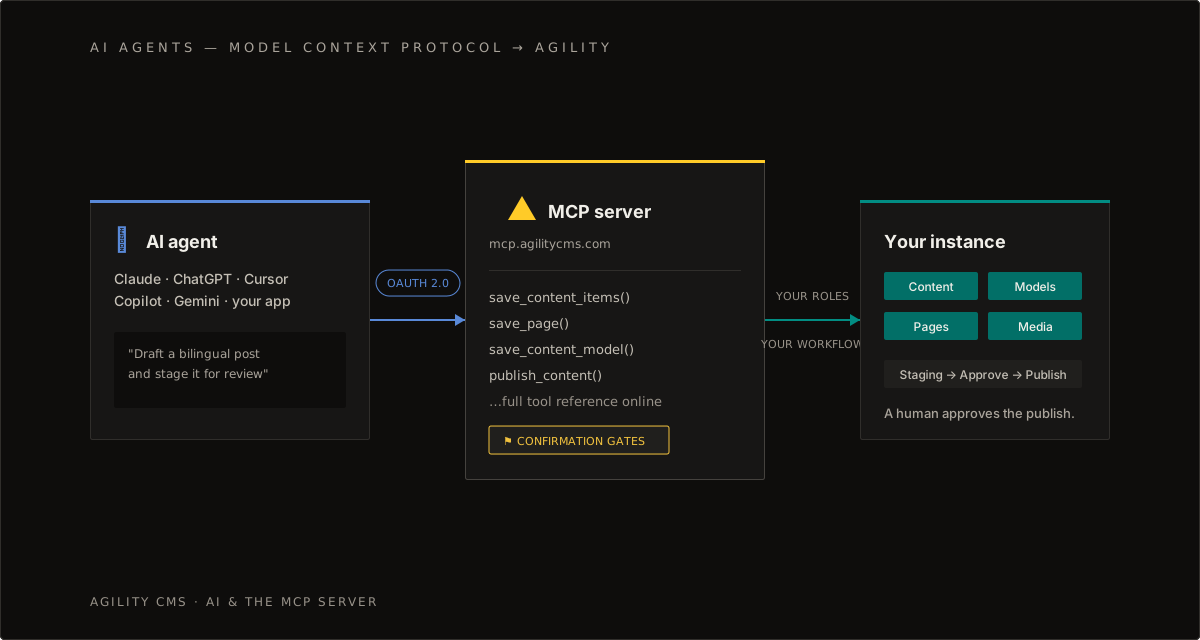
Agility CMS exposes content operations to AI agents through a Model Context Protocol server. Agents create, model, publish, and manage content under the same permissions and workflows as any user.
claude · agility-mcp
claude mcp add --transport http "Agility-CMS" https://mcp.agilitycms.com/api/mcpYou stay in control. Agents operate inside your permissions, your workflows, and your approval steps. High-stakes operations use confirmation gates, so a human approves before anything goes live.
Which server does what
There are two MCP servers, and they do different jobs.
- The management server works on your instances. It reads and writes content, models, containers, pages and media. This is the one that changes things.
- The Knowledgebase server reads these docs. It answers questions about how Agility works, and it can't touch your content.
Connect both. An agent that can look up how a feature actually works before it uses it makes noticeably fewer mistakes with the management server.
What the management server can reach
The tools map onto what you'd do in the app yourself:
- Content. List and read items, create and update them, publish, unpublish, move through workflow, delete.
- Structure. Read and write content models and component models, and create containers. An agent can build the architecture, not only fill it.
- Pages. Read the sitemap, create and update pages, reorder the components in a zone, publish and unpublish.
- Media. List assets, upload, delete.
- Locales. Read the locales configured on the instance.
It runs with your permissions
The connection uses OAuth and the agent acts as you. It can't reach an instance you can't reach, and it can't do anything your role forbids. Workflow still applies too. If a content type needs approval before it publishes, the agent hits that gate like anyone else.
For editors
Think of it as a fast, literal colleague with access to your instance. It's good at work that's tedious rather than delicate: finding things, filling gaps, applying the same change across a lot of items.
Where it earns its keep:
- Auditing. "Which blog posts have no meta description?" or "what hasn't been touched since 2023?" It reads the whole container and answers, which beats paging through the list view.
- Filling gaps. Having found them, it can draft what's missing and save each one for you to check.
- Repetitive edits. Renaming a product across 40 articles. Adding a tag to everything in a category.
- Drafting straight into the real fields, instead of writing in a doc and re-keying it afterwards.
One thing to hold onto: saving isn't publishing. Anything an agent writes lands in Staging as a new version, and your live site doesn't move. Publishing is a separate step you take deliberately. Use that gap, and read what it did before you push it live.
For developers
The management server is most useful for the work around the code: standing up an instance, keeping models and components in step, reshaping content that already exists.
Designing models in conversation
Describing a model in prose and letting the agent build it is faster than clicking through the model editor, and you can read back exactly what it made. Ask it for the model, the container, and a dozen sample items in one go, so there's something real to build against straight away.
Keeping code and CMS in step
A model change is live the moment it saves. Add a field without shipping the component change and the site degrades quietly. An agent that can see both the model and the component that renders it can do the two together, which is where most of that risk sits.
Write an AGENTS.md
Agents are only as good as their context. A file in your repo holding your instance GUIDs, container reference names, component conventions and the gotchas your team has hit will do more for the output than any amount of prompting.
Starting a site from scratch
An empty instance has no legacy to work around, so it's the easiest place to start. A sequence that works:
- Scaffold the front end from an Agility starter, so routing, data fetching and preview are already wired.
- Design the models with the agent. Describe the content types and let it create the models, containers and component models.
- Generate sample content. Ask for a dozen items, not one. Volume exposes the layout problems a single tidy example hides.
- Build components against that data, with the agent creating the page and placing components in the zone.
- Review, then publish. Everything up to this point is staged.
Order matters here. Creating the models and the code that consumes them in the same session is what keeps the two from drifting apart.
Restructuring content you already have
Migrations tend to be too big to do by hand and too specific to be worth scripting. That gap is where this works best.
Typical jobs:
- Splitting a field. An
Authortext field becomes a linkedAuthoritem across several hundred posts, deduplicated on the way through. - Merging models. Three near-identical types that drifted apart collapse into one with a variant field.
- Backfilling. A new required field on a model that already holds 500 items.
- Tidying taxonomy. Merging tags that mean the same thing.
Two rules make this safe. Work in batches: ten items, stop, look at the result, then let it do the other four hundred. And make it read before it writes, because an update sends the whole item back. A field the agent didn't read is a field it can blank.
Do a dry run first. Have the agent tell you what it's about to change and do the first few items only, before it takes on the rest. Staging gives you a version to compare against, but checking ten items is a lot easier than unpicking four hundred.
Translation and locales
Locales are first-class in Agility, so translating through an agent is a content operation rather than an export-and-reimport trip. It reads the source locale, translates, and writes into the target locale on the same instance.
Why that beats pasting into a translation tool:
- Structure survives. It works field by field, so your model, links and media references stay intact instead of collapsing into prose.
- It has the context. A field translated with the rest of the item in view reads better than the same string translated on its own, which is the usual weakness of string-table workflows.
- You can set terminology. Product and feature names you don't want translated can be stated as a rule up front.
- It lands in Staging, so a native speaker reviews it before anything goes live.
Check which locales the instance actually has before you start. The agent can read that rather than assume it.
What to watch for
Worth knowing before you lean on any of this:
- Saving never publishes. Writes go to Staging and the live site doesn't change until someone publishes. Don't read "saved" as "live".
- Updates replace the whole item. Omitted fields get cleared, so the agent has to read the current item and send every field back.
- Lists are paged. A container read returns 50 items by default and 250 at most. An agent that asks for everything, gets 50, and then reports confidently on a partial picture is the most common way answers about your content go quietly wrong.
- Staged content may be someone's work in progress. An unpublished version isn't necessarily an abandoned one. Check before you adopt or publish it.
- Publishing and deleting are visible to the world. Both are worth a confirmation step every time.
Most of these only catch you once.
Start here
Connect an agent, then go deeper — from the management MCP server to AI-assisted app building.
- Agility CMS MCP ServerConnect AI assistants to your instances: model content, create pages, bulk-edit, audit, and publish via MCP.Developers
- Knowledgebase MCP ServerGive AI assistants direct access to this documentation — search and read articles from Claude, Cursor, and more.Overview
- Building Apps with AI Coding ToolsBuild a real, deployable Agility app in a sitting with Claude Code, Cursor, or Copilot.Apps
- Advanced Next.js Demo SiteA production-grade example with AI search, AGENTS.md, and MCP server integration built in.Next.js
- MCP Server Site: Tools & InstructionsThe MCP server's own site — connection instructions and the full tool reference, always current.Reference
On this page