What is your developer-dependent CMS actually costing you? Calculate your costs and get a full report


APIs
CI/CD Integration Guide
The Agility CLI allows you to pull, push, or clone an instance from your console. This guide gives you best practices on how to integrate the Agility CLI into your CI/CD pipelines to automate content synchronization between Agility CMS instances.
This guide explains how to integrate the Agility CLI into your CI/CD pipelines to automate content synchronization between Agility CMS instances.
Overview
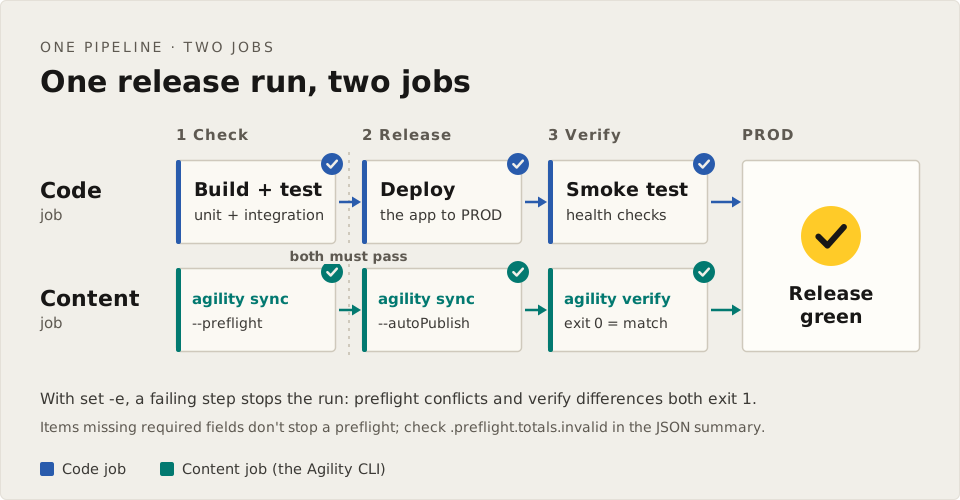
The typical CI/CD workflow involves:
- Pull the repository containing your Agility mappings
- Run the CLI sync command to synchronize content between instances
- Push the updated mappings back to the repository
Persisting mappings in a Git repository ensures that content relationships are maintained across sync operations and prevents duplicate content creation.
Prerequisites
1. Personal Access Token (PAT)
In CI/CD environments, browser-based authentication is not available. You must use a Personal Access Token (PAT) for authentication.
To get a PAT: follow Create a Personal Access Token. It takes about five minutes: sign in with agility login, then create the token with one curl call to the Management API. Store the token as a secret in your CI system, for example AGILITY_TOKEN.
2. Required Permissions
The user associated with the PAT must have one of the following roles:
- Org Admin
- Instance Admin
- Manager role on both source and target instances
3. Instance GUIDs
You'll need the GUIDs for both your source and target instances:
- Source GUID: The instance you're pulling content from
- Target GUID: The instance you're pushing content to
Find these in Settings → Instance Details in your Agility CMS dashboard.
Secrets and variables your pipeline passes
Store these in your CI/CD platform and hand them to the CLI as shown:
| Value | How the CLI receives it | Required | Description |
|---|---|---|---|
AGILITY_TOKEN | Environment variable (store it as a secret) | Yes | Personal Access Token for authentication |
| Source instance GUID | --sourceGuid | Yes | Source instance GUID |
| Target instance GUID | --targetGuid | Yes | Target instance GUID |
| Locales | --locales | No | Comma-separated locales (e.g., en-us,fr-ca) |
| Elements | --elements | No | Elements to sync (default: all) |
In CLI 1.2.1, AGILITY_TOKEN is the only environment variable the CLI reads from the process environment. Setting AGILITY_GUID, AGILITY_TARGET_GUID or AGILITY_LOCALES as pipeline environment variables does nothing on its own: the CLI reads those only from a .env file in the working directory. Pass the GUIDs as --sourceGuid and --targetGuid instead, as the sample pipelines below do.
Headless Mode
When running in CI/CD, use the --headless flag to:
- Disable interactive console output
- Log all output to files instead
- Prevent terminal UI elements that may cause issues in non-TTY environments
agility sync --headless --sourceGuid="$SOURCE_GUID" --targetGuid="$TARGET_GUID"
Sample Pipeline Configurations
GitHub Actions
name: Agility CMS Sync

on:
  # Trigger manually or on schedule
  workflow_dispatch:
  schedule:
    - cron: '0 2 * * *'  # Daily at 2 AM UTC

env:
  AGILITY_TOKEN: ${{ secrets.AGILITY_TOKEN }}
  SOURCE_GUID: ${{ vars.AGILITY_SOURCE_GUID }}
  TARGET_GUID: ${{ vars.AGILITY_TARGET_GUID }}

jobs:
  sync:
    runs-on: ubuntu-latest

    steps:
      - name: Checkout repository
        uses: actions/checkout@v4
        with:
          token: ${{ secrets.GITHUB_TOKEN }}
          fetch-depth: 0

      - name: Setup Node.js
        uses: actions/setup-node@v4
        with:
          node-version: '24'

      # Pinned, project-local install (no global install); bump the version deliberately
      - name: Install Agility CLI
        run: npm install --no-save @agility/cli@1.2.1

      - name: Run Agility Sync
        run: |
          npx agility sync \
            --headless \
            --sourceGuid="$SOURCE_GUID" \
            --targetGuid="$TARGET_GUID"

      - name: Commit and push mappings
        run: |
          git config user.name "github-actions[bot]"
          git config user.email "github-actions[bot]@users.noreply.github.com"

          # Add only the mappings directory
          git add agility-files/mappings/

          # Check if there are changes to commit
          if git diff --staged --quiet; then
            echo "No mapping changes to commit"
          else
            git commit -m "chore: update Agility CMS mappings [skip ci]"
            git push
          fi
GitHub Actions - Multi-Environment
name: Agility CMS Multi-Environment Sync

on:
  workflow_dispatch:
    inputs:
      environment:
        description: 'Target environment'
        required: true
        type: choice
        options:
          - staging
          - production

jobs:
  sync:
    runs-on: ubuntu-latest
    environment: ${{ github.event.inputs.environment }}

    steps:
      - name: Checkout repository
        uses: actions/checkout@v4
        with:
          token: ${{ secrets.GITHUB_TOKEN }}
          fetch-depth: 0

      - name: Setup Node.js
        uses: actions/setup-node@v4
        with:
          node-version: '24'

      # Pinned, project-local install (no global install); bump the version deliberately
      - name: Install Agility CLI
        run: npm install --no-save @agility/cli@1.2.1

      - name: Run Agility Sync
        env:
          AGILITY_TOKEN: ${{ secrets.AGILITY_TOKEN }}
        run: |
          npx agility sync \
            --headless \
            --sourceGuid="${{ vars.AGILITY_SOURCE_GUID }}" \
            --targetGuid="${{ vars.AGILITY_TARGET_GUID }}" \
            --locales="${{ vars.AGILITY_LOCALES }}"

      - name: Commit and push mappings
        run: |
          git config user.name "github-actions[bot]"
          git config user.email "github-actions[bot]@users.noreply.github.com"

          git add agility-files/mappings/

          if git diff --staged --quiet; then
            echo "No mapping changes to commit"
          else
            git commit -m "chore: update Agility CMS mappings (${{ github.event.inputs.environment }}) [skip ci]"
            git push
          fi
Advanced Configuration
Selective Sync by Elements
Sync only specific content types:
agility sync \
  --headless \
  --sourceGuid="$SOURCE_GUID" \
  --targetGuid="$TARGET_GUID" \
  --elements="Models,Content,Assets"
Available elements: Models, Galleries, Assets, Containers, Content, Templates, Pages, Sitemaps, UrlRedirections
Model-Specific Sync
Sync specific models with their dependencies:
agility sync \
  --headless \
  --sourceGuid="$SOURCE_GUID" \
  --targetGuid="$TARGET_GUID" \
  --models-with-deps="BlogPost,BlogCategory"
Locale-Specific Sync
Sync only specific locales:
agility sync \
  --headless \
  --sourceGuid="$SOURCE_GUID" \
  --targetGuid="$TARGET_GUID" \
  --locales="en-us,fr-ca"
Workflow Operations
After syncing content, you can perform workflow operations (publish, approve, etc.) on the synced items:
# Publish all synced content and pages
agility workflows \
  --headless \
  --sourceGuid="$SOURCE_GUID" \
  --targetGuid="$TARGET_GUID" \
  --operationType="publish"
Available operations: publish, unpublish, approve, decline, requestApproval
Full Sync + Publish Pipeline Example
# GitHub Actions example with sync and publish
- name: Sync and Publish Content
  run: |
    # First, sync the content
    agility sync \
      --headless \
      --sourceGuid="$SOURCE_GUID" \
      --targetGuid="$TARGET_GUID"

    # Then, publish the synced content
    agility workflows \
      --headless \
      --sourceGuid="$SOURCE_GUID" \
      --targetGuid="$TARGET_GUID" \
      --operationType="publish"
Best Practices
1. Store Mappings in Version Control
Always commit your agility-files/mappings/ directory to your repository. This ensures:
- Consistency across pipeline runs
- Rollback capability
- Audit trail of sync operations
- Prevention of duplicate content creation
2. Use [skip ci] in Commit Messages
Include [skip ci] in mapping commit messages to prevent infinite pipeline loops:
git commit -m "chore: update Agility CMS mappings [skip ci]"
3. Separate Environments
Use different branches or repositories for different environment mappings:
main branch       → Production sync mappings
staging branch    → Staging sync mappings
develop branch    → Development sync mappings
4. Scheduled Runs
Set up scheduled pipeline runs for regular sync operations:
# GitHub Actions cron syntax: minute hour day month weekday
schedule:
  - cron: '0 2 * * *'  # Daily at 2 AM UTC
5. Artifact Retention
Keep sync logs as artifacts for debugging:
artifacts:
  paths:
    - agility-files/logs/
  expire_in: 7 days
6. Check the Result with verify
After a sync, agility verify pulls both instances fresh and compares them, independently of the sync's own log. It exits 0 when the target matches, 1 when it finds differences and 2 when it can't produce a result, so it works as a final pipeline step:
npx agility verify --headless --sourceGuid="$SOURCE_GUID" --targetGuid="$TARGET_GUID" \
  --jsonSummary=reports/verify.json
Keep the report as a build artifact. See agility verify.
7. Handle Failures Gracefully
Use the exit code to handle sync failures:
agility sync --headless --sourceGuid="..." --targetGuid="..." || {
  echo "Sync failed, check logs for details"
  exit 1
}
Troubleshooting
Authentication Errors
- Verify the PAT is valid and not expired. To list your tokens and their expiry dates, see Manage your tokens
- Ensure the token has sufficient permissions
- Check that the
AGILITY_TOKENsecret is properly configured
SSL Certificate Errors
If your network sends traffic through a proxy that inspects TLS, the CLI rejects the proxy's certificate until Node.js trusts the proxy's certificate authority (CA). Don't turn off certificate verification (for example with --insecure or NODE_TLS_REJECT_UNAUTHORIZED=0): that would let anyone on the network path read or change your traffic, including your Agility token.
Instead, get the proxy's CA certificate from your IT team and point Node.js at it:
export NODE_EXTRA_CA_CERTS=/path/to/corporate-ca.pem
agility sync --headless --sourceGuid="..." --targetGuid="..."
Other tools in the pipeline, such as git and curl, use the runner's system certificate store, so add the CA there too (on a self-hosted runner, or in your build image).
Missing Mappings
If mappings are missing, the CLI will create new content instead of updating existing content. Always ensure:
- The
agility-files/mappings/directory is committed to your repository - The pipeline checks out the full repository (not a shallow clone)
Duplicate Content
If duplicates are being created:
- Stop all concurrent sync operations
- Restore mappings from a known good state
- Run the sync with
--preflightto check what it will do against the restored mappings, then run it again without--preflight. Each sync loads the existing mappings and extends them; CLI 1.2.1 has no separate option to rebuild them
Support
- Documentation: Agility CMS Doc Site
- Community: Agility Slack
- Issues: GitHub Issues
Command reference
The CLI command reference lists every command and option in CLI 1.2.1, one page per command: pull, sync and push, reverse-sync, verify, workflows and login and logout. It also covers exit codes and the --jsonSummary report, which a pipeline can check instead of reading the log.
In 1.2.1 the CLI reads only AGILITY_TOKEN from the process environment. Pass the GUIDs as --sourceGuid and --targetGuid, as the sample pipelines do. See Configuration from .env files.
To test the site that uses your Agility content in CI, see Test Your Agility Integration in CI.
On this page