What is your developer-dependent CMS actually costing you? Calculate your costs and get a full report


Basic Starter
Handling Preview URLs & Request Lifecycle (App Router)
How Agility preview works in the Next.js App Router — draft mode, the entry and exit routes, and the beforeFiles rewrite that keeps preview working once your pages are cached on a CDN.
In the Agility CMS Next.js Starter (App Router), Preview URLs are handled with Next.js draftMode from next/headers. This lets the app securely bypass caching and fetch the latest content drafts.
⚠️ Important: Save Your Content First Preview Mode fetches the latest Saved version of your content (Preview state). If you type into a field in Agility CMS but do not click Save, the API cannot see those changes yet unless you're using Web Studio.
The lifecycle has four parts. The first three are the request flow; the fourth is what makes it work once your site is actually cached on a CDN — that one is the most commonly missed.
- The Entry Point (
app/api/preview/route.ts) - The Page Logic (
app/[locale]/[...slug]/page.tsx) - The Exit Point (
app/api/preview/exit/route.ts) - Surviving the CDN cache (
next.configrewrites)
1. The Entry Point: app/api/preview/route.ts
Triggered when a user clicks "Preview" in the Agility Manager. It validates the security handshake and enables Draft Mode via cookies.
// app/api/preview/route.ts
import { validatePreview, getDynamicPageURL } from "@agility/nextjs/node"
import { draftMode } from "next/headers"
import { NextRequest, NextResponse } from "next/server"

export async function GET(request: NextRequest) {
  const searchParams = request.nextUrl.searchParams
  const agilityPreviewKey = searchParams.get("agilitypreviewkey") || ""
  const locale = searchParams.get("locale") || searchParams.get("lang")
  const slug = searchParams.get("slug") || "/"
  const ContentID = searchParams.get("ContentID")

  // validate the preview key, and that the requested page exists
  const validationResp = await validatePreview({ agilityPreviewKey, slug })
  if (validationResp.error) {
    return NextResponse.json({ message: validationResp.message }, { status: 401 })
  }

  let previewUrl = slug

  // if we have a content id, resolve the dynamic page url for it
  if (ContentID) {
    const dynamicPath = await getDynamicPageURL({
      contentID: Number(ContentID),
      preview: true,
      slug: slug || undefined,
    })
    if (dynamicPath) previewUrl = dynamicPath
  }

  // enable draft/preview mode
  ;(await draftMode()).enable()

  const baseUrl = `${request.nextUrl.protocol}//${request.nextUrl.host}`
  const url = new URL(`${baseUrl}${previewUrl}`)
  url.searchParams.set("preview", "1")

  return NextResponse.redirect(url.toString(), 307)
}
2. The Page Logic: app/[locale]/[...slug]/page.tsx
The page decides whether to request Preview or Published content.
Resolve preview once, then pass it down as a plain boolean. Under Cache Components, draftMode() is request-time state — read it inside your data layer and every content read becomes request-scoped, which stops the whole site prerendering.
// app/[locale]/[...slug]/page.tsx
import { getPageTemplate } from "@/components/agility-pages"
import { getAgilityPage, type PageProps } from "@/lib/cms/getAgilityPage"
import { getSitemapFlat } from "@/lib/cms/getSitemapFlat"
import { notFound } from "next/navigation"

// NOTE: no `revalidate`, `runtime` or `dynamic` exports here. All of those
// route segment configs are REJECTED under cacheComponents. Freshness comes
// from cacheLife() on each cached read plus the publish webhook.

export async function generateStaticParams() {
  // go through your cached sitemap getter — not a hand-rolled SDK client —
  // so the build and the render share one cache entry per locale.
  const sitemap = await getSitemapFlat({
    channelName: process.env.AGILITY_SITEMAP || "website",
    languageCode: "en-us",
    preview: false,          // never bake staging content into static pages
  })

  return Object.values(sitemap)
    .filter((node) => !node.isFolder && !node.redirect)
    .map((node) => ({ slug: node.path.split("/").filter(Boolean) }))
}

export default async function Page({ params }: PageProps) {
  const agilityData = await getAgilityPage({ params })
  if (!agilityData.page) notFound()

  const Template = getPageTemplate(agilityData.pageTemplateName || "")
  return (
    <main
      data-agility-page={agilityData.page?.pageID}
      data-agility-dynamic-content={agilityData.sitemapNode.contentID}
    >
      <Template {...agilityData} />
    </main>
  )
}
And the single place preview is resolved:
// lib/cms/getAgilityContext.ts
import { draftMode } from "next/headers"

export const getAgilityContext = async (locale?: string) => {
  let isPreview = false
  try {
    isPreview = (await draftMode()).isEnabled
  } catch {
    // called outside a request scope (e.g. generateStaticParams) — published mode
  }

  // local dev shows editors' unpublished work by default;
  // FORCE_PUBLISHED=1 makes `next dev` behave like production
  if (process.env.NODE_ENV === "development" && process.env.FORCE_PUBLISHED !== "1") {
    isPreview = true
  }

  return { isPreview, locale: locale || "en-us" }
}
3. The Exit Point: app/api/preview/exit/route.ts
Lets a user turn preview off and return to the published site.
// app/api/preview/exit/route.ts
import { getDynamicPageURL } from "@agility/nextjs/node"
import { draftMode } from "next/headers"
import { NextRequest, NextResponse } from "next/server"

export async function GET(request: NextRequest) {
  const searchParams = request.nextUrl.searchParams
  const slug = searchParams.get("slug")
  const ContentID = searchParams.get("ContentID")

  ;(await draftMode()).disable()

  let url = new URL(slug || "/", request.nextUrl.origin).toString()

  if (ContentID) {
    const dynamicPath = await getDynamicPageURL({
      contentID: Number(ContentID),
      preview: false,
      slug: slug || undefined,
    })
    if (dynamicPath) url = new URL(dynamicPath, request.nextUrl.origin).toString()
  }

  const urlObj = new URL(url)
  urlObj.searchParams.delete("preview")

  return NextResponse.redirect(urlObj.toString(), 307)
}
4. Surviving the CDN cache — the step everyone misses
Most guides stop at step 3. On a real deployment that is not enough, and the way it fails is silent.
The ?agilitypreviewkey= handshake is usually routed by your proxy (proxy.ts — Next 16's renamed middleware.ts). But the proxy is a Node function, and Vercel and Netlify do not invoke it when they serve a page straight from the edge cache. That is exactly what happens to every prerendered page.
So on the pages that matter most:
- the preview key never reaches
/api/preview - draft mode is never enabled
- Web Studio renders the published page, with no error anywhere
Editors report "preview is showing the old content" and developers can't reproduce it locally — because under next start the proxy always runs.
The fix: a beforeFiles rewrite
beforeFiles rewrites are compiled into the platform's routes manifest and evaluated before the cache lookup, so they always reach your route handler:
// next.config.ts
async rewrites() {
  return {
    beforeFiles: [
      {
        source: "/:path((?!api).*)",
        has: [{ type: "query", key: "agilitypreviewkey" }],
        destination: "/api/preview?slug=/:path",
      },
      {
        source: "/:path((?!api).*)",
        // `has.value` is a regex — anchor it, or a bare "0" also matches "10"
        has: [{ type: "query", key: "AgilityPreview", value: "^0$" }],
        destination: "/api/preview/exit?slug=/:path",
      },
      {
        source: "/:path((?!api).*)",
        has: [{ type: "query", key: "ContentID" }],
        destination: "/api/dynamic-redirect?slug=/:path",
      },
    ],
  }
}
Notes:
- Keep the proxy logic too. The proxy handles uncached requests (where it runs first); the rewrites take over on cached ones. They converge on the same handlers, so there's no double-handling. Removing either side reopens the hole.
- The
(?!api)guard stops/api/previewitself from matching and looping. - The incoming query string is carried over automatically —
agilitypreviewkey,langandContentIDall arrive. Onlyslugneeds adding. - You cannot verify this locally. Under
next startthe proxy runs beforebeforeFilesand wins every time. Confirm the rules compiled (.next/routes-manifest.json), then test preview on a real deploy, on a page that appears in the build's prerendered list.
Summary of the Data Flow
- User clicks Preview in Agility →
mysite.com/about?agilitypreviewkey=xyz&lang=en-us - Routing → the
beforeFilesrewrite (cached request) orproxy.ts(uncached) sends it to/api/preview - Entry → validates the key, calls
draftMode().enable(), redirects to/about - Rendering →
getAgilityContext()readsdraftMode().isEnabled, passespreview: truedown, and the SDK fetches draft content — uncached - Result → the editor sees unpublished, work-in-progress content
Configure the Preview URL
⚠️ Don't forget to configure your Agility instance
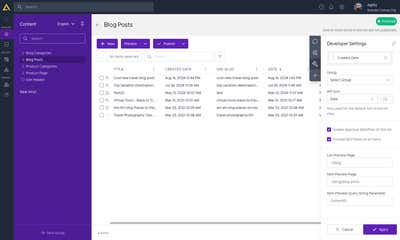
Full guide: Setting up Preview
Troubleshooting
- Preview shows published content on some pages only — almost always the CDN cache-bypass problem in step 4. The pages that fail are the prerendered ones. Check that the
beforeFilesrewrites are innext.config. - Check
.env.local—AGILITY_SECURITY_KEYmust match the key in Agility. - Localhost always previews —
NODE_ENV === "development"forces preview on. UseFORCE_PUBLISHED=1 npm run devto test the published experience without deploying. - Cookie blocking — inside a Web Studio iframe, ensure the browser allows third-party cookies, or open preview in a new tab.
- The whole site renders dynamically — something in your data layer is calling
draftMode()(orcookies()/headers()). Resolve preview once at the page or layout level and pass it down.
On this page