What is your developer-dependent CMS actually costing you? Calculate your costs and get a full report


Concepts
Core CMS Concepts
Understanding the fundamental concepts and architecture of Agility CMS
Understanding the fundamental concepts and architecture of Agility CMS
This section explains the core concepts and mental models that underpin Agility CMS. These guides help you understand why Agility CMS works the way it does, not just how to use it.
Table of Contents
1. Agility Data Model
Overview
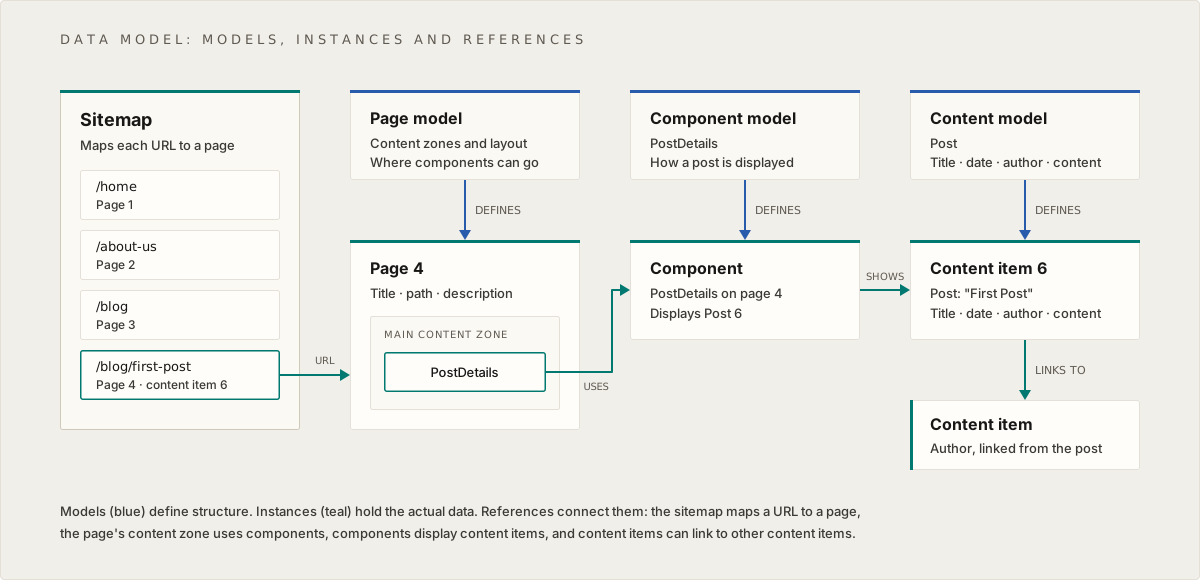
The Agility Data Model illustrates how content, presentation, and navigation are structured and related in Agility CMS. It shows the separation between models (schemas/definitions) and instances (actual data), and how they connect through references.
Key Concepts
Three-Layer Architecture
1. Models (Schema Layer)
- Page Model: Defines the structure for pages
- Component Model: Defines the structure for reusable UI components
- Content Model: Defines the structure for reusable content items
Models are like blueprints—they define what fields exist and what types of data they hold, but don't contain actual content.
2. Instances (Data Layer)
- Pages: Actual page instances created from page models
- Components: Component instances with actual data
- Content Items: Standalone content pieces created from content models
Instances are the actual data—the filled-out forms, the real content.
3. Relationships (Reference Layer)
- Sitemap: Organizes pages and defines URLs
- Page → Components: Pages contain references to components
- Component → Content: Components display content items
- Content → Content: Content items can link to other content items
How It Works
Sitemap Structure
The sitemap is the navigation backbone of your site:
/home: 1                    → Points to Page ID 1
/about-us: 2                → Points to Page ID 2
/blog: 3                    → Points to Page ID 3
/blog/first-post: 4, content: 6  → Page ID 4, displays Content ID 6
Each sitemap entry maps a URL path to a page, and optionally to specific content.
Page Structure
A page is a container that:
- Has metadata (title, description, path)
- References multiple components
- Can be organized in a sitemap hierarchy
Example Page:
{
  "pageID": 2,
  "name": "home",
  "path": null,
  "title": "Home",
  "menuText": "Home",
  "pageType": "static",
  "templateName": "Main Template",
  "zones": {
    "main-content-zone": [
      {
        "module": "PersonalizedBackgroundHero",
        "item": {
          "contentID": 186,
          "properties": {
            "state": 2,
            "referenceName": "home_personalizedbackgroundh48f36e",
            "definitionName": "PersonalizedBackgroundHero"
          },
          "fields": {
            "heading": "Close Every Deal",
            "description": "Galaxy Tech helps you sell more...",
            "cta1": {
              "href": "/contact-us",
              "text": "Get started"
            }
          }
        }
      },
      {
        "module": "BentoSection",
        "item": {
          "contentID": 27,
          "properties": {
            "referenceName": "home_bentosection",
            "definitionName": "BentoSection"
          },
          "fields": {
            "heading": "Know everything your customers do...",
            "bentoCards": {
              "referencename": "home_bentosection_bentocard",
              "fulllist": true
            }
          }
        }
      }
    ]
  }
}
Component Structure
Components are reusable UI building blocks. When placed on a page, they appear in the zones array:
Example Component (BentoSection):
{
  "contentID": 27,
  "properties": {
    "state": 2,
    "referenceName": "home_bentosection",
    "definitionName": "BentoSection",
    "itemOrder": 0
  },
  "fields": {
    "subheading": "Sales",
    "heading": "Know everything your customers do and so much more",
    "bentoCards": {
      "referencename": "home_bentosection_bentocard",
      "fulllist": true
    }
  }
}
Components define how content is presented, not what content is shown.
Content Structure
Content items are standalone, reusable pieces of data:
Example Content (Post):
{
  "contentID": 204,
  "properties": {
    "state": 2,
    "modified": "2025-12-08T15:12:10.883",
    "versionID": 1287,
    "referenceName": "posts",
    "definitionName": "Post",
    "itemOrder": 22
  },
  "fields": {
    "heading": "Changed Heading",
    "slug": "future-of-retail-ai-customer-intelligence",
    "postDate": "2025-10-08T04:00:00+00:00",
    "category": {
      "contentID": 61,
      "properties": {
        "referenceName": "categories",
        "definitionName": "Category"
      },
      "fields": {
        "name": "Knowledge"
      }
    },
    "categoryID": "61",
    "categoryName": "Knowledge",
    "tags": [
      {
        "contentID": 8,
        "fields": {
          "name": "A.I."
        }
      }
    ],
    "author": {
      "contentID": 59,
      "fields": {
        "name": "Emily Selman",
        "headShot": {
          "url": "https://cdn.agilitycms.com/...",
          "label": null
        }
      }
    },
    "content": "<p>The retail landscape has undergone...</p>",
    "image": {
      "label": "Man at a computer",
      "url": "https://cdn.agilitycms.com/..."
    }
  }
}
Content items define what data exists, independent of where it's displayed.
Relationships and Flow
- Sitemap → Page: Each URL maps to a page
- Page → Components: Pages contain multiple components
- Component → Content: Components display content items
- Content → Content: Content items can reference other content items
Why This Model?
Separation of Concerns:
- Content (data) is separate from Components (presentation)
- Pages (navigation) are separate from Content (data)
- This allows maximum flexibility and reusability
Reusability:
- Content items can be used in multiple components
- Components can be used on multiple pages
- Update content once, see changes everywhere
Flexibility:
- Change presentation without changing content
- Change content without changing pages
- Support multiple frontends from one CMS
Real-World Example
Blog Post Scenario:
- Content Model: "Post" defines fields (title, date, author, content)
- Content Item: A specific blog post (e.g., "First Post", ID: 6)
- Component Model: "PostDetails" defines how to display a post
- Component Instance: A PostDetails component that displays Post ID: 6
- Page: A page model that includes the PostDetails component
- Sitemap:
/blog/first-postmaps to the page, which displays Post ID: 6
Benefits:
- The same Post content can be displayed in different components
- The same PostDetails component can display different posts
- Posts can be reused in listings, featured sections, etc.
2. Headless Architecture
Overview
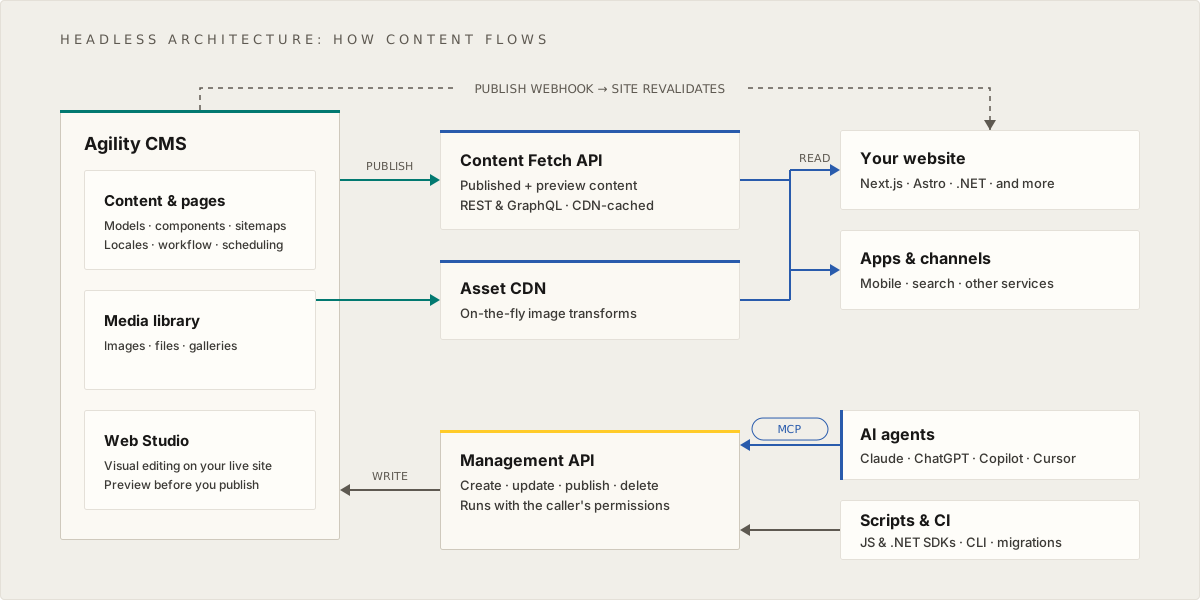
Headless architecture separates content management from content delivery. Content is managed in one place (the CMS) but can be consumed by any number of frontend applications through APIs.
Architecture Components
Backend (Agility CMS)
Content Manager
- Web-based interface for content editing
- Where content editors create and manage content
- Provides preview and publishing workflows
Content APIs
- RESTful APIs that expose content as JSON
- Standard HTTP methods (GET, POST, etc.)
- Stateless, cacheable API endpoints
- Supports filtering, sorting, pagination
Asset CDN
- Content Delivery Network for media assets
- Optimized image delivery
- Automatic resizing and format conversion
- Global distribution for performance
Frontend Applications
Website
- Traditional web application (e.g., Next.js, React)
- Consumes content via Content APIs
- Renders HTML for browsers
- Can be statically generated or server-rendered
Apps
- Mobile applications (iOS, Android)
- Desktop applications
- IoT devices
- Any application that can consume APIs
End-User Devices
Devices
- Desktop browsers
- Mobile browsers
- Native mobile apps
- Smart TVs, IoT devices
- Any device that can access the frontend applications
Data Flow
- Content Creation: Editors create content in Content Manager
- API Exposure: Content is automatically exposed via Content APIs
- Frontend Consumption: Website/Apps fetch content via APIs
- Asset Delivery: Images/assets served directly from CDN
- User Access: Users access rendered content on their devices
Why Headless?
Multi-Channel Publishing
Same Content, Multiple Channels:
- Website: Next.js application
- Mobile App: React Native application
- Kiosk: Custom display application
- All consume the same Content APIs
Benefits:
- Create content once, publish everywhere
- Consistent content across channels
- Channel-specific presentation
Technology Freedom
Frontend Flexibility:
- Use any frontend framework (React, Vue, Angular, etc.)
- Use any programming language
- Deploy anywhere (Vercel, AWS, Azure, etc.)
- No vendor lock-in for frontend
Developer Experience:
- Modern development tools
- Version control for frontend code
- CI/CD pipelines
- Testing frameworks
Performance
CDN Delivery:
- Assets served from edge locations
- Reduced latency globally
- Automatic optimization
Caching:
- API responses can be cached
- Static site generation
- Incremental static regeneration
Scalability:
- Scale CMS and frontend independently
- Handle traffic spikes efficiently
- Optimize each layer separately
Future-Proofing
New Channels:
- Add new frontends without changing CMS
- Support emerging platforms
- Adapt to new technologies
Content Reuse:
- Content remains valuable as technology changes
- No need to migrate content for new frontends
- Long-term content investment
Comparison: Traditional vs Headless
Traditional CMS (Monolithic):
CMS → HTML → Browser
- CMS generates HTML
- Tightly coupled
- Limited flexibility
Headless CMS:
CMS → APIs → Frontend → HTML → Browser
- CMS provides data
- Loosely coupled
- Maximum flexibility
Real-World Example
E-commerce Scenario:
- Content Manager: Product information, descriptions, images
- Content APIs: Expose products, categories, reviews
- Website: Next.js e-commerce site consuming APIs
- Mobile App: React Native app consuming same APIs
- Admin Dashboard: Custom admin interface consuming APIs
- Asset CDN: Product images served via CDN
Benefits:
- Product data managed once
- Consistent across all channels
- Each channel optimized for its platform
- Easy to add new channels (voice assistant, AR, etc.)
3. Agility Sections
Overview
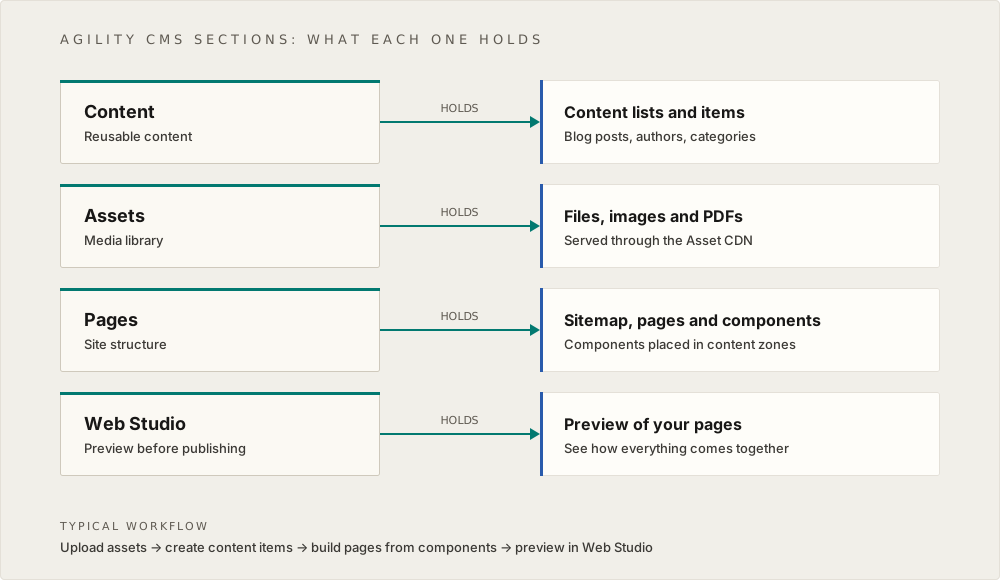
The Agility Sections diagram illustrates the four main functional areas of the Agility CMS interface. Each section serves a specific purpose in the content management workflow.
The Four Sections
1. Content Section
Purpose: Manage reusable content items and lists
Contains: Lists / Items
What You Do Here:
- Create and edit content items (e.g., Blog Posts, Authors, Categories)
- Organize content into lists
- Manage relationships between content items
- Set up content models and fields
Key Concepts:
- Content Items: Single, standalone pieces of content
- Content Lists: Collections of related content items
- Content Models: Templates that define content structure
Example Workflows:
- Creating a new blog post
- Adding an author profile
- Organizing posts by category
- Setting up product catalogs
2. Assets Section
Purpose: Manage digital media files
Contains: Files / Images / PDFs
What You Do Here:
- Upload images, documents, videos
- Organize assets in folders
- Manage asset metadata
- Optimize and resize images
Key Concepts:
- Media Library: Centralized storage for all assets
- CDN Delivery: Assets served via Content Delivery Network
- Automatic Optimization: Images automatically optimized
Example Workflows:
- Uploading hero images
- Organizing product photos
- Managing document downloads
- Adding alt text for accessibility
3. Pages Section
Purpose: Manage website structure and page content
Contains: Sitemap, Pages, Components
What You Do Here:
- Build and organize pages in the sitemap
- Add components to pages
- Configure page models
- Set up dynamic page routing
Key Concepts:
- Sitemap: Navigation structure of your site
- Pages: Individual web pages
- Components: Reusable UI building blocks
- Content Zones: Areas where components can be placed
Example Workflows:
- Creating a new page
- Adding a hero component to a page
- Organizing pages in the sitemap
- Setting up blog post detail pages
4. Web Studio Section
Purpose: Preview and test content before publishing
Contains: Preview
What You Do Here:
- Preview pages and content
- Test responsive designs
- Review content before publishing
- Debug layout issues
Key Concepts:
- Live Preview: See how content will appear
- Device Testing: Preview on different screen sizes
- Draft Preview: Preview unpublished content
Example Workflows:
- Previewing a new page design
- Testing mobile responsiveness
- Reviewing content before publishing
- Checking component layouts
How Sections Work Together
Typical Workflow:
- Assets: Upload images needed for content
- Content: Create content items (e.g., blog posts) using those images
- Pages: Build pages using components that display the content
- Web Studio: Preview the pages to see how everything looks
Example: Creating a Blog Post
- Assets: Upload featured image for the post
- Content: Create a new Post content item, add text, link to the image
- Pages: The blog listing page automatically shows the new post (if using dynamic routing)
- Web Studio: Preview the post to see how it looks
Section Relationships
Content ↔ Assets:
- Content items reference assets (images, documents)
- Assets are managed separately but used in content
Pages ↔ Content:
- Pages use components that display content items
- Content items can be used on multiple pages
Pages ↔ Components:
- Pages are built from components
- Components define how content is presented
Web Studio ↔ Everything:
- Web Studio previews the final result
- Shows how all sections come together
Mental Model
Think of Agility CMS like building a house:
- Content: The materials (wood, bricks, etc.) - reusable resources
- Assets: The tools and supplies (images, documents) - supporting materials
- Pages: The rooms (pages) built from components (walls, doors, windows)
- Web Studio: The blueprint preview - see how everything looks before building
Best Practices
Content Section:
- Create reusable content items
- Organize content logically
- Use relationships to connect related content
Assets Section:
- Organize assets in folders
- Use descriptive filenames
- Optimize images before uploading
Pages Section:
- Plan page structure in sitemap
- Use components consistently
- Keep page models organized
Web Studio Section:
- Always preview before publishing
- Test on multiple devices
- Review content for accuracy
Understanding the Big Picture
These three concepts work together:
- Data Model explains how content is structured
- Headless Architecture explains why this structure exists
- Sections explain where you work with content
Together, they form a complete picture:
- Content is structured for flexibility (Data Model)
- Content is delivered via APIs for multi-channel support (Headless Architecture)
- Content is managed through organized sections (Sections)
Understanding these concepts helps you:
- Make better decisions about content structure
- Plan for multi-channel publishing
- Work more efficiently in the CMS
- Troubleshoot issues more effectively
Next Steps
After understanding these concepts:
- Review the role-specific guides with this context
- Apply these concepts to your content strategy
- Design content models with reusability in mind
- Plan for multi-channel content delivery
You understand Agility CMS when you can:
- Explain why content is separate from presentation
- Design content models that support multiple channels
- Navigate the CMS sections with purpose
- Make architectural decisions based on these principles
On this page