What is your developer-dependent CMS actually costing you? Calculate your costs and get a full report


Developers
Introduction to Agility CMS for Developers
Agility CMS is a **headless content management system** designed for developers who want flexibility, performance, and modern development workflows.
Agility CMS is a headless content management system designed for developers who want flexibility, performance, and modern development workflows.
What is a Headless CMS?
A headless CMS separates content management from content presentation:
- Content Management: Editors create and manage content in the CMS
- Content Delivery: Your frontend application fetches content via APIs
- Presentation: Your code controls how content is displayed
This separation gives you:
- Technology Freedom: Use any frontend framework (React, Vue, Next.js, etc.)
- Multi-Channel Publishing: Same content for web, mobile, IoT
- Performance: CDN delivery, optimized caching
- Developer Control: Full control over presentation and user experience
Understanding Headless Architecture
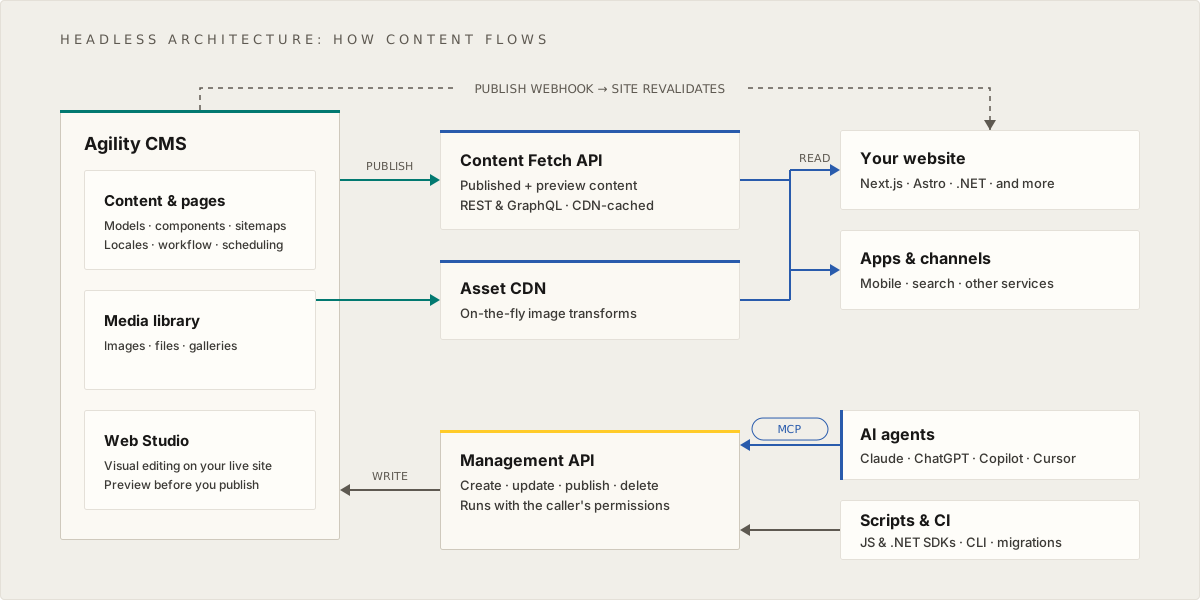
When you publish, content is served through the Content Fetch API and images through the Asset CDN, and your website and other apps read from them. A publish webhook tells your site to revalidate. Writes go through the Management API: AI agents connect through the MCP server, and scripts and CI use the SDKs and CLI.
Key Components:
- Content Manager: Web-based interface for content editing
- Content APIs: RESTful APIs that expose content as JSON
- Asset CDN: Content delivery network for media assets
- Frontend Application: Your website, mobile app, or other application
- User Devices: Browsers, mobile devices accessing your application
Understanding the Data Model
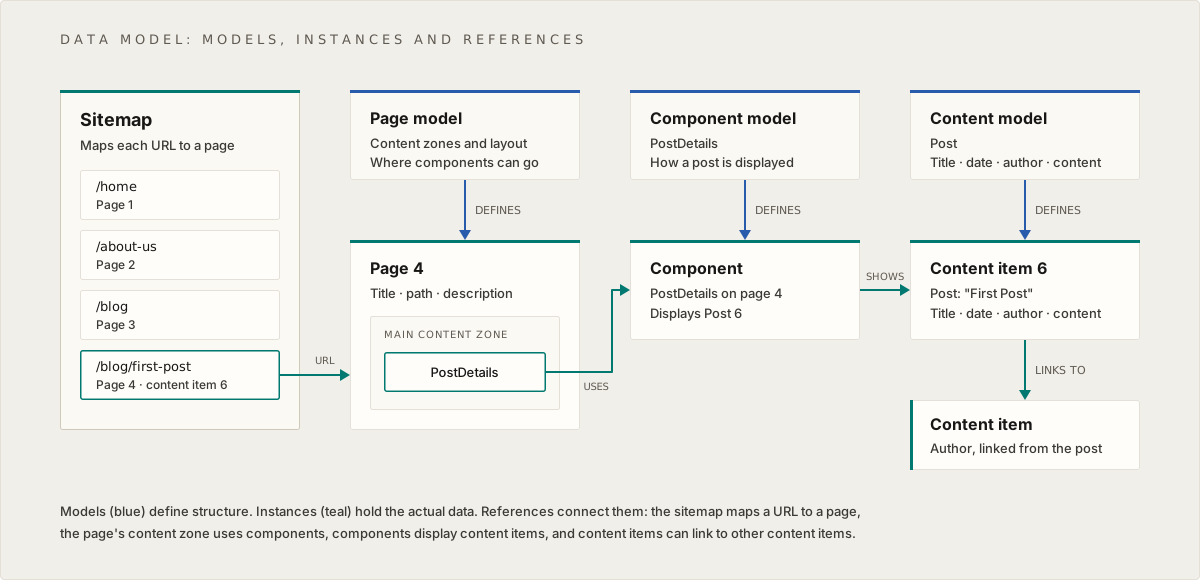
The Agility data model shows how a Sitemap organizes Pages, Pages contain Components, and Components display Content Items. Each entity (Page, Component, Content) has a corresponding Model that defines its structure.
Core Concepts:
- Sitemap: Maps URLs to pages
- Pages: Contain multiple components in content zones
- Components: Reusable UI building blocks that display content
- Content Items: Standalone, reusable pieces of content
- Models: Define the structure (schema) for pages, components, and content
Developer Workflow
1. Content Modeling (Setup Phase)
Content editors and administrators define:
- Content Models: Structure for reusable content (e.g., Blog Post, Author)
- Component Models: Structure for UI components (e.g., Hero, Card Grid)
- Page Models: Structure for pages (content zones, layout)
2. Content Creation (Editor Phase)
Content editors create:
- Content Items: Actual content instances (e.g., "My First Blog Post")
- Components: Component instances with data
- Pages: Page instances with components
3. Content Consumption (Developer Phase)
Your application:
- Fetches content via APIs
- Renders components based on page structure
- Displays content items in components
- Handles routing, caching, and optimization
Agility CMS APIs
Agility CMS provides several APIs:
Content Fetch API
- Purpose: Retrieve published content
- Use Case: Production websites and applications
- Base URL:
https://api.aglty.io/{instance-guid}/fetch
Content Management API
- Purpose: Create, update, and manage content programmatically
- Use Case: Automated content workflows, migrations
- Base URL:
https://api.aglty.io/{instance-guid}/content
Content Sync API
- Purpose: Bulk content synchronization
- Use Case: Offline solutions, reduced build times
- Base URL:
https://api.aglty.io/{instance-guid}/sync
GraphQL API
- Purpose: Query content using GraphQL
- Use Case: Complex queries, specific data requirements
- Base URL:
https://api.aglty.io/{instance-guid}/graphql
SDKs and Frameworks
Agility CMS provides official SDKs for popular frameworks:
- Next.js:
@agility/nextjs- React Server Components support - Nuxt:
@agility/agilitycms-nuxt-module- Vue.js support - JavaScript:
@agility/content-fetch- Core JavaScript SDK - Python:
agilitycms- Python SDK - .NET:
Agility.Web- .NET SDK
For new projects we recommend Next.js, or ASP.NET Core with the .NET SDK for .NET teams. Any other framework can use the JavaScript SDK or the Content Fetch API directly; see Vibe Coding with Agility to build with the framework of your choice.
Key Developer Benefits
1. Type Safety
- TypeScript support
- Type-safe content access
- Compile-time error checking
2. Performance
- CDN delivery for assets
- Built-in caching strategies
- Optimized API responses
3. Developer Experience
- Modern APIs and SDKs
- Comprehensive documentation
- Active community support
4. Flexibility
- Use any frontend framework
- Custom component development
- Full control over presentation
5. Preview Mode
- Preview draft content
- Test changes before publishing
- Seamless editor experience
Common Use Cases
Website Development
- Marketing websites
- Corporate websites
- E-commerce sites
- Documentation sites
Multi-Channel Publishing
- Websites + mobile apps
- Digital displays
- IoT devices
- API consumers
Content-First Development
- Start with content structure
- Build components to display content
- Iterate on presentation independently
What You'll Learn
This guide will teach you:
- How to set up Agility CMS in your project
- How to fetch content from Agility APIs
- How to build custom components
- How to implement caching and performance optimization
- How to handle preview mode and draft content
- How to implement internationalization
- How to follow best practices for development
Each section focuses on how Agility CMS works in general, not how a specific instance is configured. This knowledge will apply to any Agility CMS instance you work with.
Next: Architecture - Deep dive into headless architecture and data model
On this page