What is your developer-dependent CMS actually costing you? Calculate your costs and get a full report


Architects
Data Model Deep Dive
This guide provides a deep understanding of the Agility CMS data model, including the three-layer architecture, relationships, and design patterns.
This guide provides a deep understanding of the Agility CMS data model, including the three-layer architecture, relationships, and design patterns.
Three-Layer Architecture
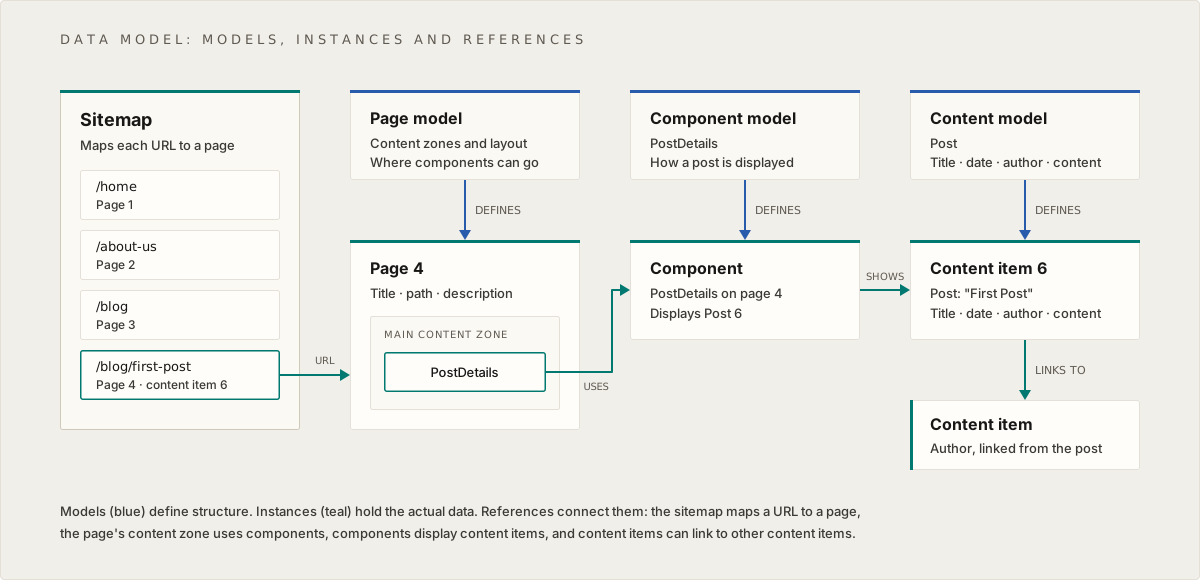
The Agility data model uses a three-layer architecture:
Layer 1: Models (Schema Layer)
Purpose: Define structure and schema
Models are blueprints that define:
- What fields exist
- Field types (text, image, linked content, etc.)
- Validation rules
- Default values
Model Types:
- Page Models: Define page structure (content zones, layout)
- Component Models: Define reusable UI component structure
- Content Models: Define reusable content item structure
Layer 2: Instances (Data Layer)
Purpose: Actual data instances
Instances are the actual data:
- Pages: Page instances created from page models
- Components: Component instances with actual data
- Content Items: Standalone content pieces created from content models
Layer 3: Relationships (Reference Layer)
Purpose: Connect entities together
Relationships connect entities:
- Sitemap: Organizes pages and defines URLs
- Page → Components: Pages contain references to components
- Component → Content: Components display content items
- Content → Content: Content items can link to other content items
Model Design Patterns
Content Model Patterns
Pattern 1: Standalone Content
Use Case: Single, independent piece of content
Example: Author profile
- Name, title, headshot
- Used in multiple places
- Managed independently
Pattern 2: Collection Content
Use Case: Related items that form a collection
Example: Blog Posts
- Multiple posts with similar structure
- Need to be queried/filtered
- Support pagination
Pattern 3: Linked Content
Use Case: Content with relationships
Example: Blog Post
- Links to Author (one-to-one)
- Links to Category (one-to-one)
- Links to Tags (many-to-many)
Component Model Patterns
Pattern 1: Simple Component
Use Case: Direct field mapping
Example: Hero component
- Heading, description, image, CTA
- All fields stored directly in component
Pattern 2: Content-Linked Component
Use Case: Component that displays content items
Example: Post Listing component
- Links to Posts content list
- Displays filtered/sorted posts
Pattern 3: Nested Component
Use Case: Component with nested content
Example: Bento Section
- Component has nested Bento Cards
- Cards fetched separately using reference name
Relationship Patterns
One-to-One
Example: Post → Author
- One post has one author
- Author can have multiple posts (reverse: many-to-one)
One-to-Many
Example: Post → Tags
- One post has many tags
- Tags can be on multiple posts (reverse: many-to-many)
Many-to-Many
Example: Post ↔ Tags
- Posts can have multiple tags
- Tags can be on multiple posts
Parent-Child
Example: BentoSection → BentoCards
- Parent component references child content list
- Children fetched separately using reference name
Content Model Types
Content Items
Characteristics:
- Single, standalone instances
- Best for: Authors, Categories, Global Settings
- Managed as individual items
Use When:
- Content is unique (one instance)
- Content doesn't need to be queried as a list
- Content is referenced by other content
Content Lists
Characteristics:
- Collections of related items
- Best for: Blog Posts, Testimonials, Pricing Tiers
- Support querying, filtering, pagination
Use When:
- Multiple items with same structure
- Need to query/filter items
- Items form a logical collection
Design Considerations
Reusability
Question: Will this content be used in multiple places?
- Yes → Content Model: Create reusable content model
- No → Component Field: Store directly in component
Relationships
Question: Does this content relate to other content?
- Yes → Linked Content Field: Use linked content fields
- No → Standalone: Keep content independent
Querying Needs
Question: Do you need to query/filter this content?
- Yes → Content List: Use content list for querying
- No → Content Item: Use content item for single instance
Personalization
Question: Does this content need personalization?
- Yes → Audience/Region Fields: Add personalization fields
- No → Standard Content: Use standard content model
Best Practices
- Plan Models First: Design content models before building components
- Identify Reusability: Determine what content should be reusable
- Design Relationships: Plan how content relates to other content
- Consider Queries: Design for efficient querying
- Plan for Growth: Design models that scale
Next: Content Strategy - Content modeling strategies
On this page