What is your developer-dependent CMS actually costing you? Calculate your costs and get a full report


Architects
Architecture Overview
This guide provides an architectural overview of Agility CMS, focusing on design principles, patterns, and strategic considerations for solution architects.
This guide provides an architectural overview of Agility CMS, focusing on design principles, patterns, and strategic considerations for solution architects.
Headless Architecture
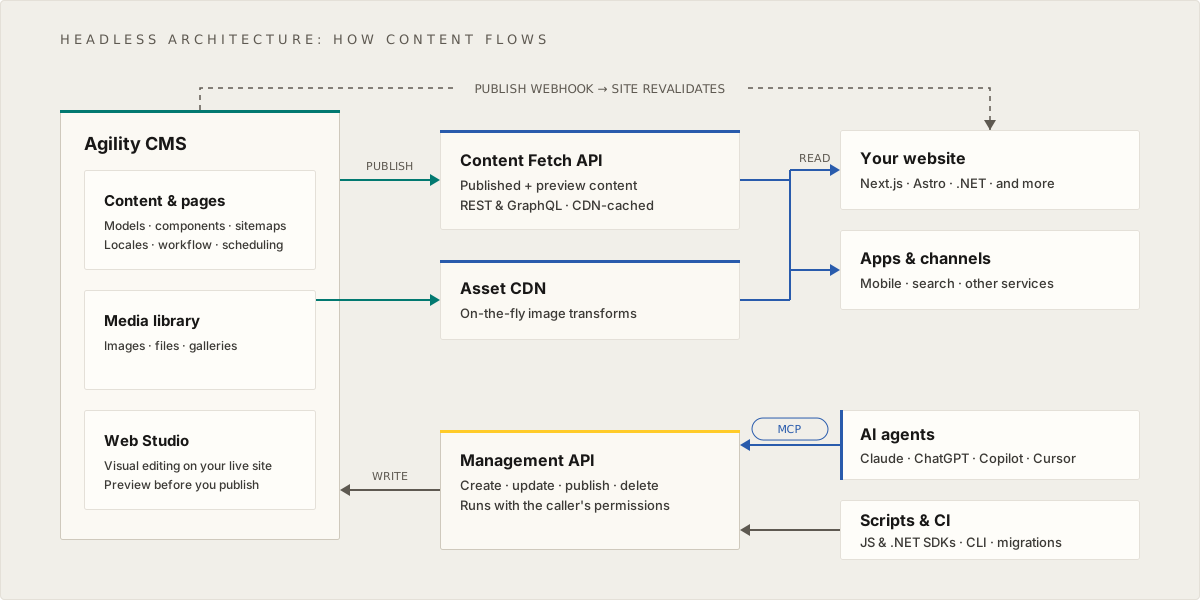
Agility CMS follows a headless architecture pattern that separates content management from content delivery.
Architectural Principles
-
Separation of Concerns
- Content management (backend) independent of presentation (frontend)
- Content APIs provide data, not HTML
- Frontend applications consume APIs and render content
-
API-First Design
- All content exposed via RESTful APIs
- JSON-based data exchange
- Stateless API interactions
- GraphQL support for complex queries
-
Multi-Channel Support
- Same content APIs serve multiple frontends
- Website, mobile apps, IoT devices consume same content
- Channel-specific presentation logic in frontend
-
CDN Integration
- Assets delivered via Content Delivery Network
- Optimized performance for global audiences
- Automatic image optimization and resizing
Data Model Architecture
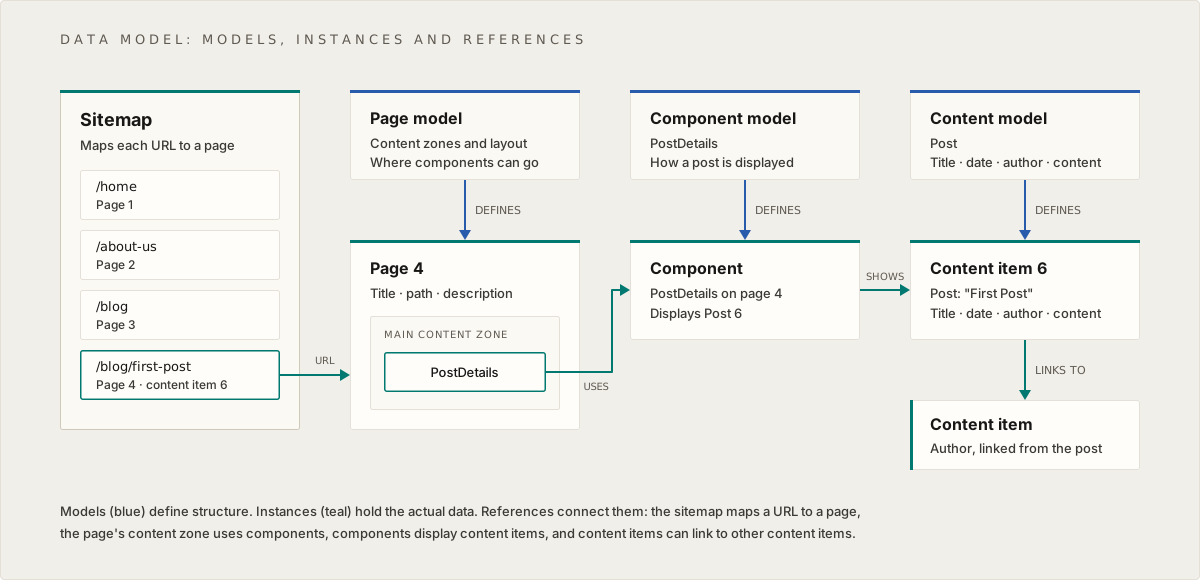
The Agility data model uses a three-layer architecture:
Layer 1: Models (Schema Layer)
Purpose: Define structure and schema
- Page Models: Define page structure (content zones, layout)
- Component Models: Define reusable UI component structure
- Content Models: Define reusable content item structure
Layer 2: Instances (Data Layer)
Purpose: Actual data instances
- Pages: Page instances created from page models
- Components: Component instances with actual data
- Content Items: Standalone content pieces created from content models
Layer 3: Relationships (Reference Layer)
Purpose: Connect entities together
- Sitemap: Organizes pages and defines URLs
- Page → Components: Pages contain references to components
- Component → Content: Components display content items
- Content → Content: Content items can link to other content items
Interface Organization
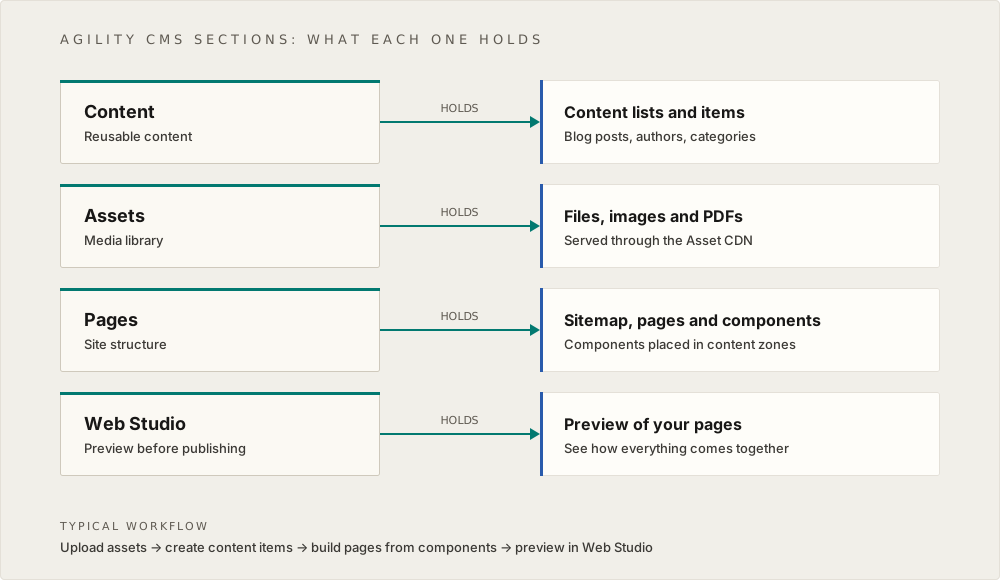
The Agility CMS interface is organized into four main sections:
- Content: Manage Lists and Items (reusable content)
- Assets: Manage Files, Images, and PDFs (media library)
- Pages: Manage Sitemap, Pages, and Components (page structure)
- Web Studio: Preview content before publishing
Architectural Benefits
Flexibility
- Change frontend without affecting content
- Use any frontend framework or technology
- Adapt presentation to different channels
Scalability
- Scale CMS and frontend independently
- Optimize each layer separately
- Handle traffic spikes efficiently
Reusability
- Content and components used across multiple pages/channels
- Single source of truth for content
- Consistent content across channels
Performance
- CDN delivery for assets
- Optimized caching strategies
- Fast API responses
Developer Experience
- Modern APIs and SDKs
- TypeScript support
- Comprehensive documentation
Architectural Decision Framework
When to Use Content Models vs Component Fields
Use Content Models When:
- Content is reused across multiple pages/components
- Content has relationships with other content
- Content needs to be managed independently
- Content supports personalization
Use Component Fields When:
- Content is specific to one component instance
- Content is simple (text, image, link)
- Content doesn't need relationships
When to Use Content Items vs Content Lists
Use Content Items When:
- Single, standalone piece of content
- Example: Global Settings, Author profile
Use Content Lists When:
- Collection of related items
- Items need to be queried/filtered
- Example: Blog Posts, Testimonials
Multi-Channel Architecture
Channel Types
- Website: Traditional web pages
- Mobile App: Native mobile applications
- API: Custom integrations
- Digital Displays: Kiosks, signage
Content Strategy
- Design content models for reuse
- Avoid presentation-specific fields
- Plan for API consumption
- Support multiple locales
Integration Architecture
Frontend Integration
- SDKs: Framework-specific SDKs (such as
@agility/nextjsfor Next.js), plus the JavaScript and .NET SDKs for any other framework - APIs: RESTful and GraphQL APIs
- Caching: Built-in caching strategies
- Preview: Preview mode support
Third-Party Integrations
- Analytics: PostHog, Google Analytics
- Search: Algolia, custom search
- AI: Azure OpenAI, custom AI services
- CDN: Asset delivery optimization
Performance Architecture
Optimization Strategies
- CDN Delivery: Assets via CDN
- Image Optimization: Automatic resizing and formats
- Caching: Multi-layer caching strategy
- Static Generation: Pre-render pages at build time
- Incremental Regeneration: Update pages on-demand
Scalability Considerations
- Horizontal Scaling: Scale frontend independently
- Content Scaling: Efficient content querying
- Asset Scaling: CDN for global delivery
- API Scaling: Optimized API responses
Next: Data Model - Deep dive into the data model
On this page