What is your developer-dependent CMS actually costing you? Calculate your costs and get a full report


Solutions
Searching Content at Scale
How to give visitors fast, relevant search over your Agility content — and how to choose between Algolia, Azure AI Search, Elastic and Coveo.
Visitors expect to find what they're looking for in a single search. With a small amount of content, you can build a basic search on the Content Fetch API by filtering content lists. Once you have hundreds of pages, several content types or several languages, you need a search index: a copy of your content stored in a form built for fast, relevant search, with typo tolerance, ranking, highlighting and facets.
Agility doesn't lock you into a search engine. You can use any search provider, because every provider is fed the same way.
How search works with Agility
- Editors publish in Agility as usual.
- Agility sends a webhook to your application each time content is published, unpublished or deleted.
- Your application fetches the published content from the Fetch API and sends it to your search provider's index.
- Your website or app queries the search provider directly, or through a small API route of its own.
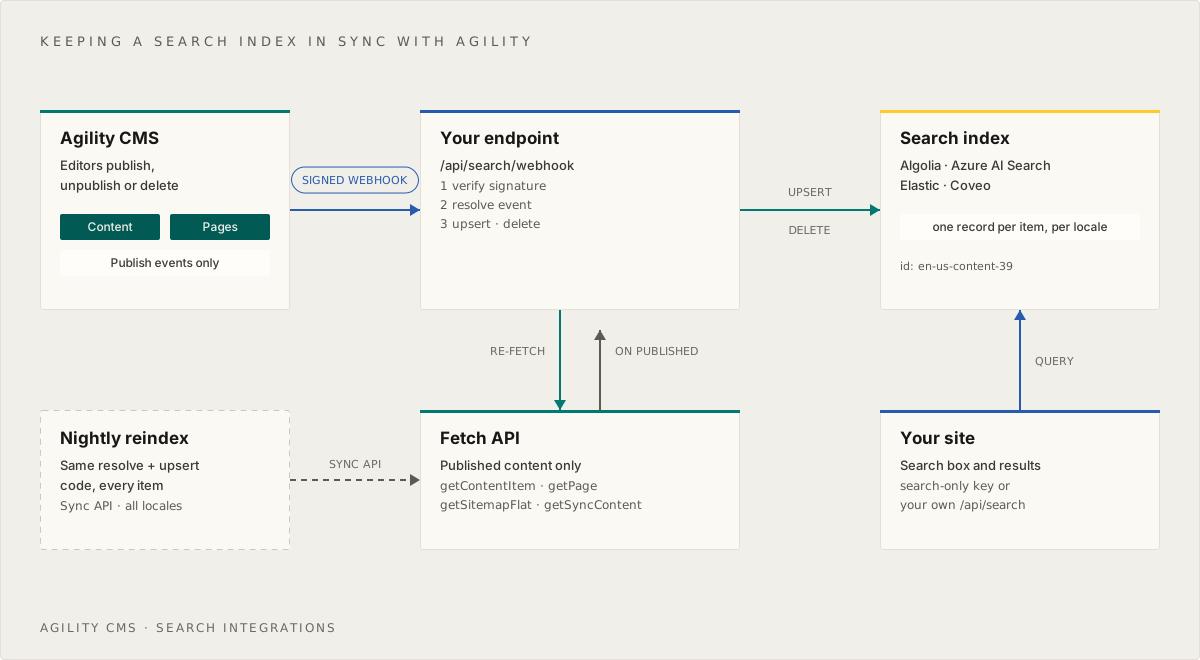
A scheduled full reindex backs this up, catching anything a webhook missed. Indexing Agility Content for Search walks through the whole pattern, with code, and it's the same for every provider.
Choosing a provider
| Algolia | Azure AI Search | Elastic | Coveo | |
|---|---|---|---|---|
| Best for | Fast setup and polished search-as-you-type | Teams already on Azure | Full control, and complex or very large indexes | Enterprise relevance and personalization |
| Hosting | Hosted | Azure | Serverless, Elastic Cloud or self-managed | Hosted |
| Getting started | Free plan | Free tier; Basic for production | Serverless, usage-based | Sales-led; trial available |
| Front-end UI | InstantSearch (React, Vue, JS) | Build your own | Search UI, or build your own | Atomic and Headless |
| Semantic and hybrid search | NeuralSearch (Elevate plan) | Built in (semantic ranker, vectors) | Built in (semantic_text, hybrid retrievers) | Built in |
| AI assistants | Agent Studio | Knowledge bases, with an MCP endpoint | Agent Builder, with an MCP endpoint | Relevance Generative Answering, Passage Retrieval API |
A few rules of thumb:
- Just need great site search, quickly? Start with Algolia. It has the most complete ready-made UI and a free plan to build on.
- Your organization runs on Microsoft Azure? Azure AI Search keeps search inside your existing subscription, identity and compliance setup.
- Need to own the engine, with custom analyzers, very large indexes, logs and search in one place, or self-hosting? Choose Elastic.
- Search is a revenue channel that needs personalization, merchandising and analytics across several sources? Coveo is built for that.
Search for AI assistants
A search index is also what an AI assistant or chatbot needs in order to answer from your content rather than guess. The same webhook pipeline that powers site search can keep an assistant's knowledge current. Each provider guide covers its AI options, and Indexing Agility Content for Search explains how to split long content into passages for better answers.
If you want AI tools to work with your Agility content directly, rather than through your website's search, see the Agility MCP server.
Other providers
The pattern works with any provider that accepts documents over an API, including Typesense, Meilisearch and Amazon OpenSearch Service. Follow Indexing Agility Content for Search, and replace the three provider calls — add or replace a document, delete a document, and bulk add — with your provider's SDK.
On this page