What is your developer-dependent CMS actually costing you? Calculate your costs and get a full report


Editors
Core Concepts
This section provides a deep understanding of the fundamental concepts that make Agility CMS work.
This section provides a deep understanding of the fundamental concepts that make Agility CMS work. Understanding these concepts will help you work more effectively with any Agility CMS instance.
1. Agility Data Model
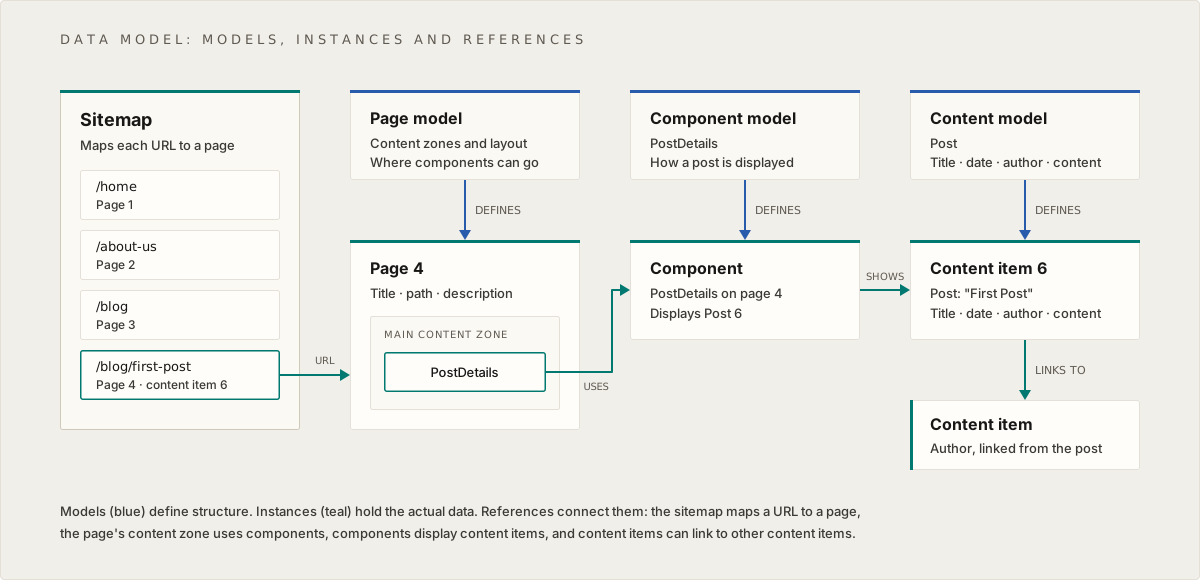
The Agility Data Model shows how content, presentation, and navigation are structured and related.
Three-Layer Architecture
1. Models (Schema Layer)
- Page Model: Defines the structure for pages (content zones, layout)
- Component Model: Defines the structure for reusable UI components
- Content Model: Defines the structure for reusable content items
Models are like blueprints—they define what fields exist and what types of data they hold, but don't contain actual content.
2. Instances (Data Layer)
- Pages: Actual page instances created from page models
- Components: Component instances with actual data
- Content Items: Standalone content pieces created from content models
Instances are the actual data—the filled-out forms, the real content.
3. Relationships (Reference Layer)
- Sitemap: Organizes pages and defines URLs
- Page → Components: Pages contain references to components
- Component → Content: Components display content items
- Content → Content: Content items can link to other content items
How It Works
- Content Models define what fields a content item has (e.g., "Post" has title, body, author)
- Content Items are created from content models (e.g., "My First Blog Post")
- Component Models define what fields a component has (e.g., "Hero" has heading, image, CTA)
- Components are placed on pages and can link to content items
- Pages are organized in a sitemap and contain components
- Sitemap maps pages to URLs
Key Insight
Content is separated from presentation. The same content item (e.g., a blog post) can be displayed by different components in different ways, or on different pages entirely.
2. Headless Architecture
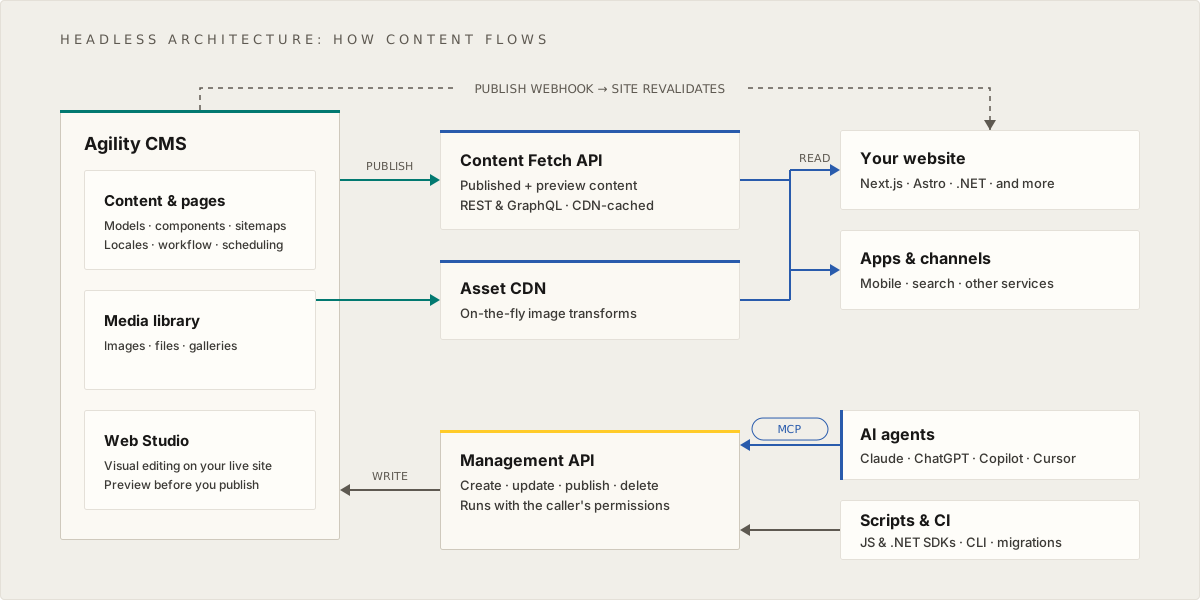
Agility CMS uses a headless architecture, meaning the content management system (the "head") is completely separate from where content is displayed (the "body").
Traditional CMS vs Headless CMS
Traditional CMS:
- Content management and display are tightly coupled
- Content is stored and displayed in the same system
- Limited flexibility for multi-channel publishing
Headless CMS:
- Content management is separate from content delivery
- Content is exposed via APIs
- Frontend applications consume the API
- Same content can power websites, mobile apps, and more
How Agility CMS Works
- Content Manager: You create and manage content in the Agility CMS interface
- Content API: Agility CMS exposes content through REST APIs
- Frontend Application: Your website, mobile app, or other application fetches content from the API
- CDN: Assets (images, files) are delivered directly via CDN for performance
Benefits
- Multi-channel: Same content for web, mobile apps, digital displays
- Technology freedom: Use any frontend framework (React, Vue, Next.js, etc.)
- Performance: CDN delivery, optimized caching
- Scalability: Scale content management and frontend independently
3. Agility Sections
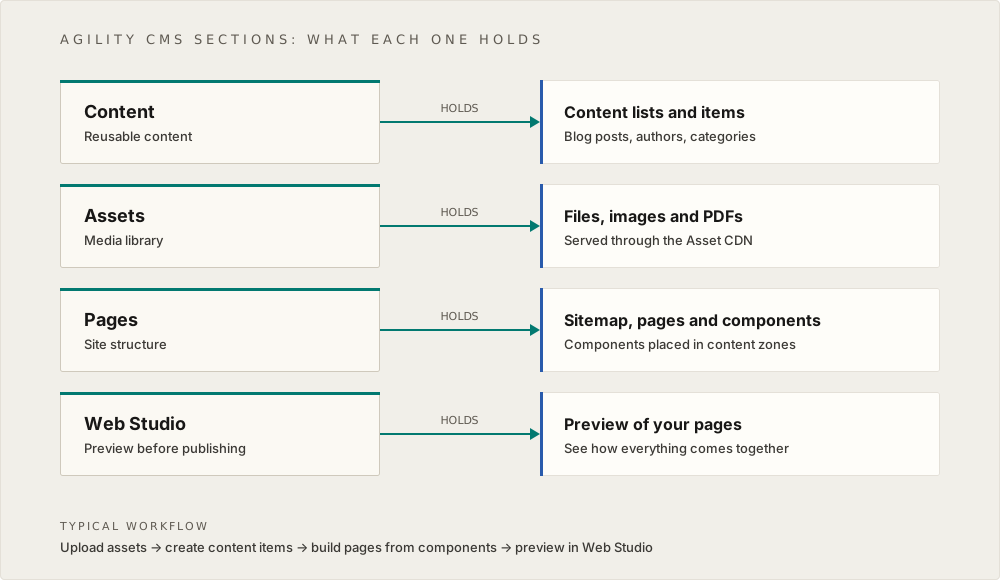
The Agility CMS interface is organized into four main sections, each serving a specific purpose:
Content Section
Purpose: Manage reusable content items
What you do here:
- Create and edit content items
- Organize content into lists
- Link content items together
- Manage content models
Key concept: Content items are reusable. Create once, use anywhere.
Assets Section
Purpose: Manage media files
What you do here:
- Upload images, documents, and other files
- Organize files into folders
- Manage file metadata (alt text, descriptions)
- Access files via CDN
Key concept: Assets are delivered via CDN for optimal performance.
Pages Section
Purpose: Manage page structure and content
What you do here:
- Create and edit pages
- Organize pages in the sitemap
- Add components to pages
- Configure page models and content zones
Key concept: Pages are built by combining components in content zones.
Web Studio Section
Purpose: Preview content before publishing
What you do here:
- Preview pages and content
- Test how content will appear
- Compare draft vs published versions
Key concept: Preview helps ensure content looks correct before going live.
How These Concepts Work Together
- Content Section: You create reusable content items (e.g., blog posts, testimonials)
- Pages Section: You build pages by adding components to content zones
- Components: Components on pages can link to content items from the Content section
- Assets Section: You upload images and files that components and content items reference
- Web Studio: You preview everything before publishing
This separation allows for:
- Reusability: Same content item used in multiple places
- Flexibility: Change how content is displayed without changing the content itself
- Efficiency: Update content once, see changes everywhere it's used
Next: Navigation - How to navigate the Agility CMS interface
On this page