What is your developer-dependent CMS actually costing you? Calculate your costs and get a full report


Editors
Introduction to Agility CMS
Agility CMS is a **headless content management system** that separates content management from presentation.
Agility CMS is a headless content management system that separates content management from presentation. This means:
- Content is reusable: Create content once, use it anywhere
- Flexible presentation: The same content can appear on websites, mobile apps, or other platforms
- Modular approach: Pages are built using reusable components
Understanding Headless Architecture
Agility CMS follows a headless architecture pattern, where content management is completely separate from content delivery:
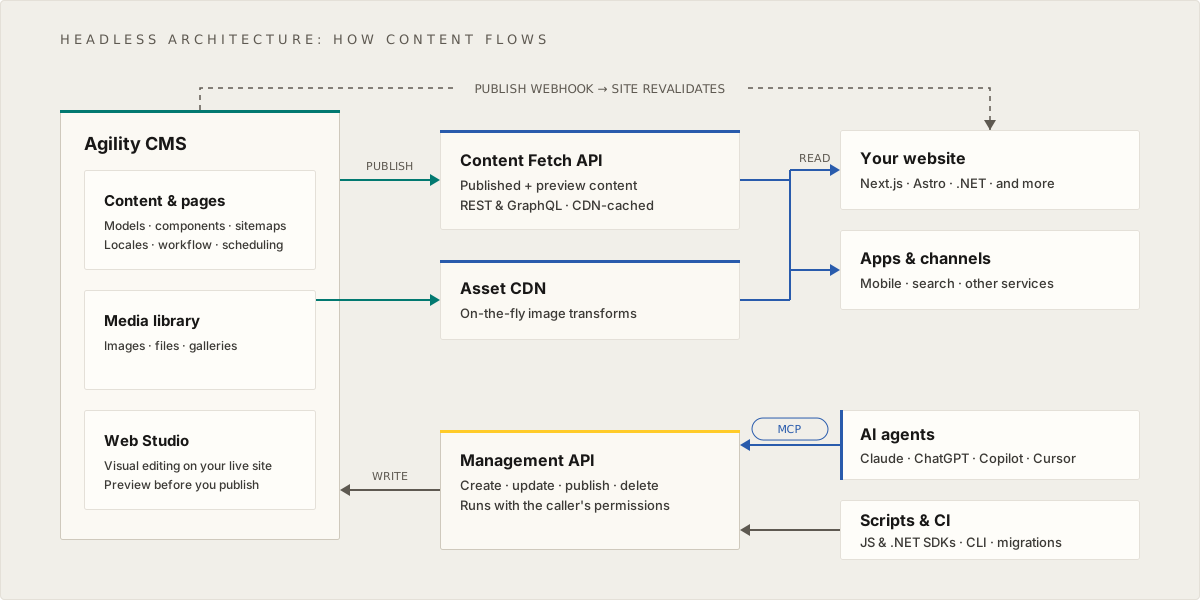
In a headless architecture, publishing makes your content available through the Content Fetch API and your images through the Asset CDN. Your website and other apps and channels read from them, and a publish webhook tells your site to revalidate. In the other direction, AI agents (through the MCP server) and scripts (through the SDKs and CLI) write content through the Management API.
Key Benefits:
- Multi-channel publishing: Same content for web, mobile, and other platforms
- Technology freedom: Use any frontend framework or technology
- Performance: CDN delivery and optimized asset management
- Scalability: Scale content management and frontend independently
Understanding the Data Model
Agility CMS organizes content using a structured data model that separates content from presentation:
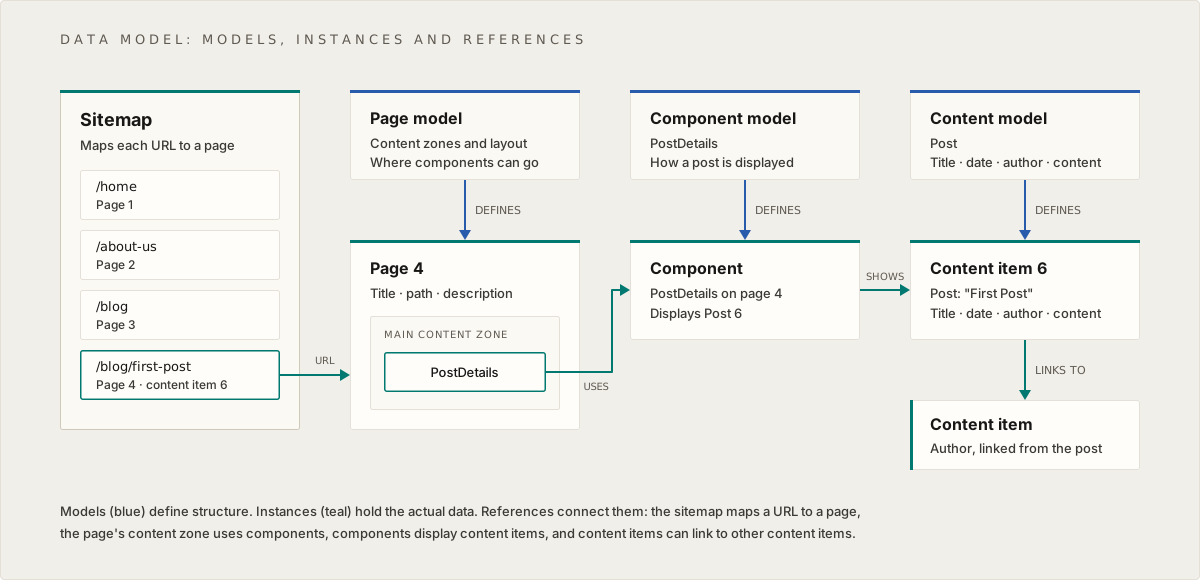
The Agility data model shows how a Sitemap organizes Pages, Pages contain Components, and Components display Content Items. Each entity (Page, Component, Content) has a corresponding Model that defines its structure. This separation allows content to be reused across multiple pages and components.
Key Relationships:
- Sitemap → Maps URLs to Pages
- Pages → Contain multiple Components
- Components → Display Content Items
- Content Items → Standalone, reusable pieces of content
Understanding the Interface
The Agility CMS interface is organized into four main sections:
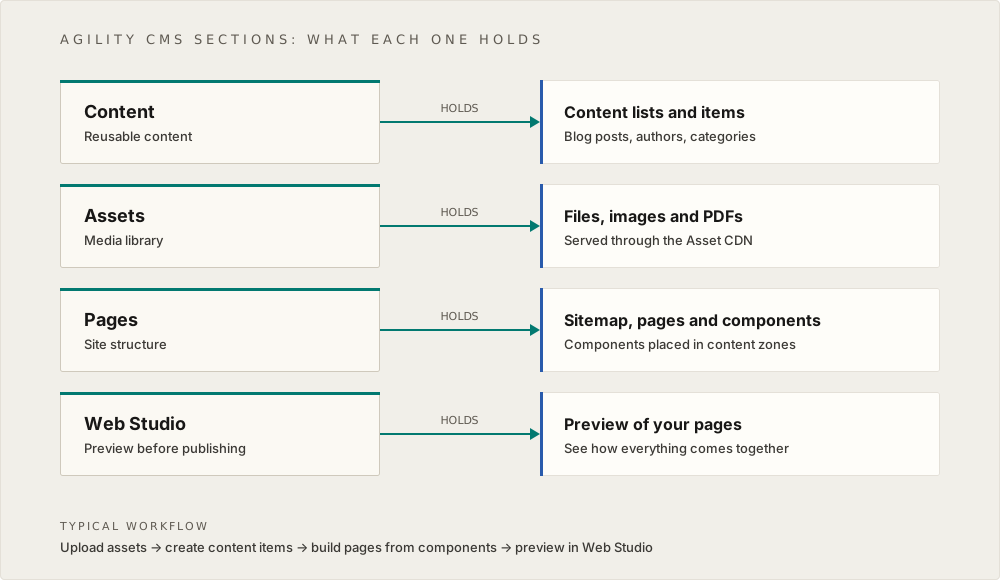
The Agility CMS interface is organized into four main sections:
- Content: Manage Lists and Items (reusable content)
- Assets: Manage Files, Images, and PDFs (media library)
- Pages: Manage Sitemap, Pages, and Components (page structure)
- Web Studio: Preview content before publishing
Key Concepts
Pages → Individual web pages organized in a sitemap Components → Reusable building blocks that display content on pages Content Items → Standalone pieces of content that can be linked to components Media → Images, documents, and other digital assets
What You'll Learn
This generic training guide will teach you:
- How to navigate the Agility CMS interface
- How to create and manage content items
- How to build pages using components
- How to work with the media library
- How to publish and preview content
- How to troubleshoot common issues
Each section focuses on how Agility CMS works in general, not how a specific instance is configured. This knowledge will apply to any Agility CMS instance you work with.
Next: Core Concepts - Deep dive into the Agility Data Model, Headless Architecture, and Sections
On this page